Contents
- Keycloak URL
- Realms
- Expected LDAP structure
- Add LDAP to a realm
- LDAP settings
- Restrict groups authorized to connect
- Map LDAP groups to HPA roles
- FAQ : Logout from webview leads to Exception
Keycloak URL
The default keycloak management URL is : https://<portal>/keycloak
Realms
The both realms in Keycloak can be configure with a LDAP:
- Master to authenticate as administrator on Keycloak itself
- Hexagon-HPA to authenticate users on HPA portal and Webview
The LDAP can be identical or different
Expected LDAP structure
The following is only an example — adapt it to your own Active Directory or LDAP structure. Here users are in one branch and access groups in another, with the membership stored on the group entries; the mapper values given later in this page follow from that layout and must be adjusted to match yours.
dc=example,dc=org
├── ou=people                                  <- Users DN
│   ├── uid=alice          uid, cn, sn, mail
│   ├── uid=bob
│   └── uid=carol
└── ou=groups                                  <- LDAP Roles DN
    ├── cn=hpa_user        member: uid=alice…, uid=bob…, uid=carol…
    ├── cn=hpa_admin       member: uid=alice…
    └── cn=other_group     member: uid=dave…
A group entry, with the attribute each mapper field will read:
dn: cn=hpa_admin,ou=groups,dc=example,dc=org
objectClass: groupOfNames                        # Role Object Classes
cn: hpa_admin                                    # Role Name LDAP Attribute
member: uid=alice,ou=people,dc=example,dc=org    # Membership LDAP Attribute
member holds the full DN of the user, hence Membership Attribute Type =
DN; the uid= component of that DN is what Membership User LDAP Attribute
points at.
Two groups drive HPA access: one for standard users, one for administrators
(hpa_user / hpa_admin in the examples below). The administrator role is
declared in security.config.
To test the integration without a corporate directory, contact Hexagon to obtain a sample LDAP docker stack reproducing the structure above, with ready-made users and groups.
Add LDAP to a realm
For LDAP authentication:
- open the
Hexagon-HPArealm - open
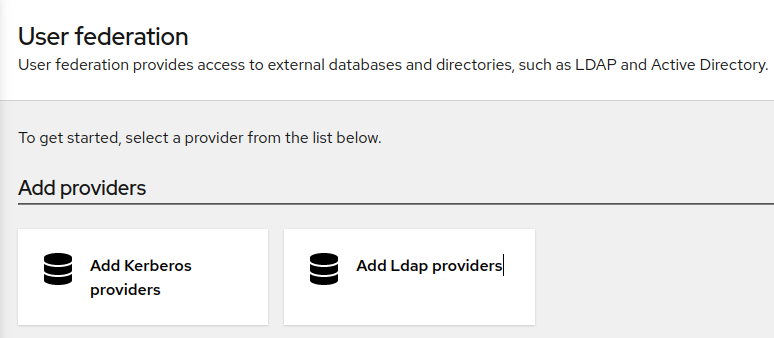
User federationin the left menu - click on
Add Ldap providers
LDAP settings
Enter the LDAP information
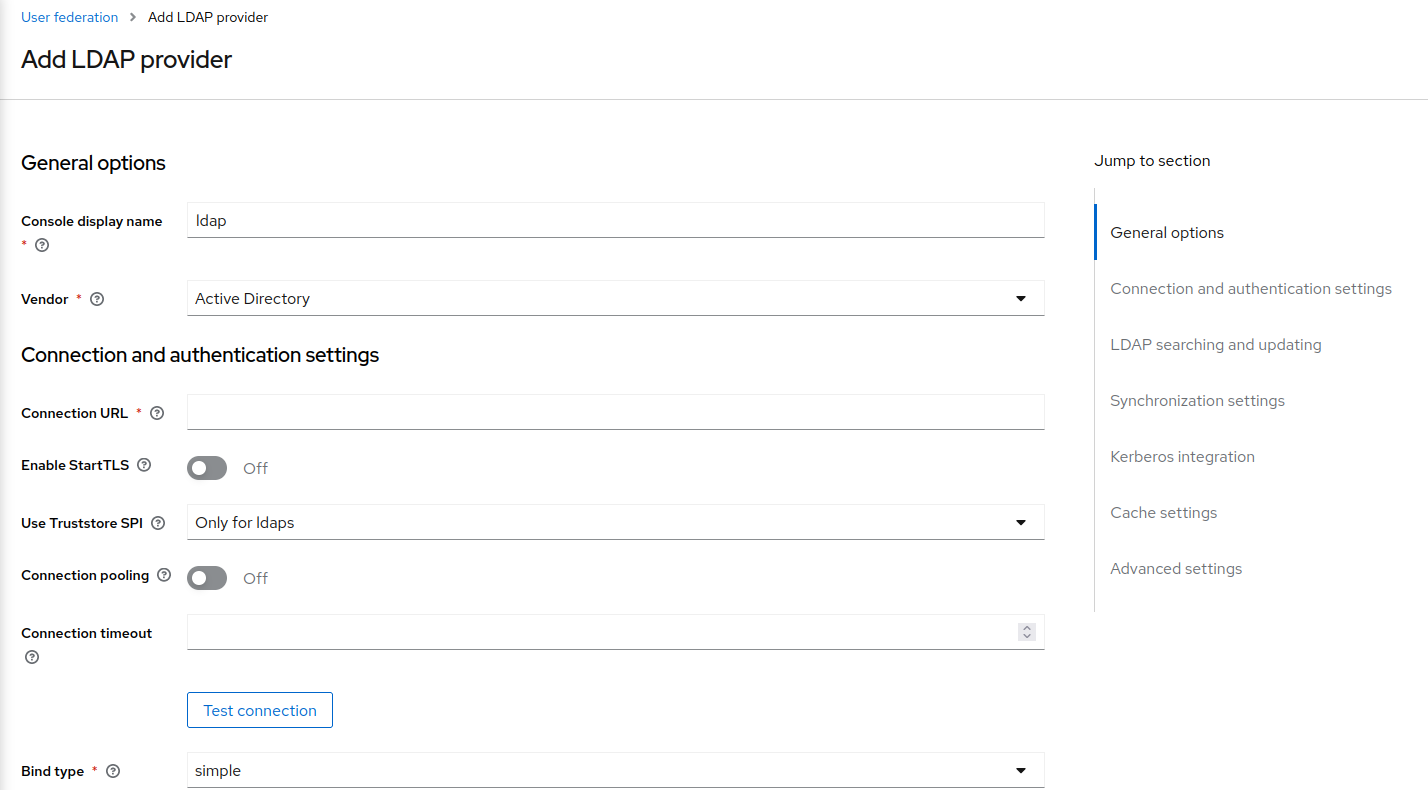
The tables below give the values used for a groupOfNames directory; adapt
them to your LDAP.
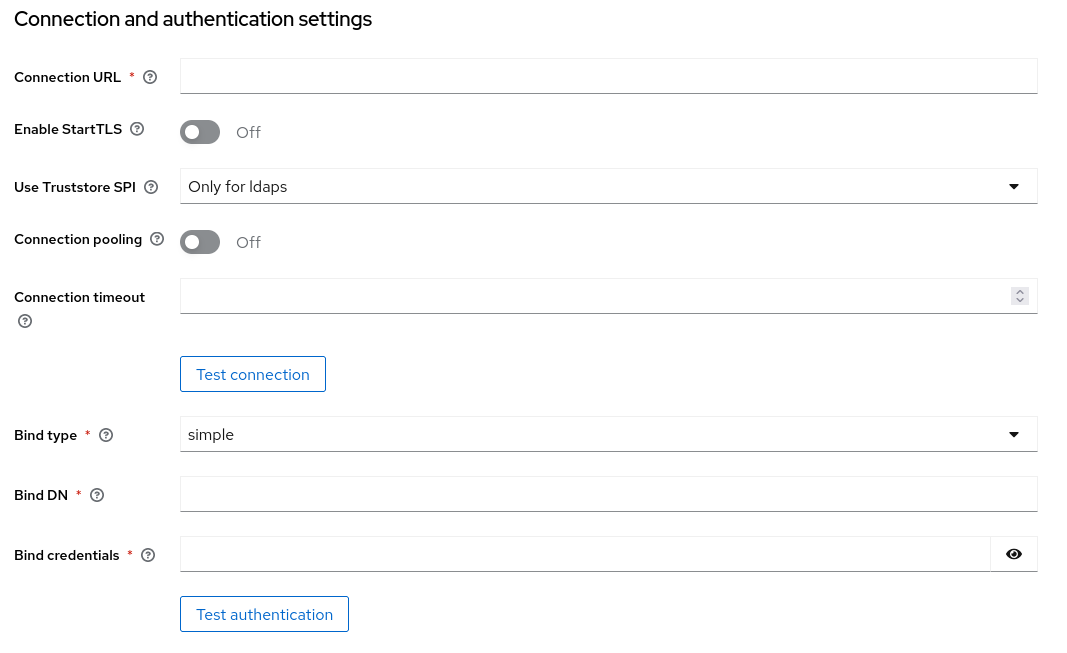
Connection and authentication
| Keycloak field | Value |
|---|---|
| Console display name | ldap |
| Vendor | Other (Active Directory for AD) |
| Connection URL | ldap://server:389 |
| Enable StartTLS | Off |
| Use Truststore SPI | Only for ldaps |
| Connection pooling | Off |
| Bind type | simple |
| Bind DN | cn=admin,dc=example,dc=org |
| Bind credentials | the bind user password |
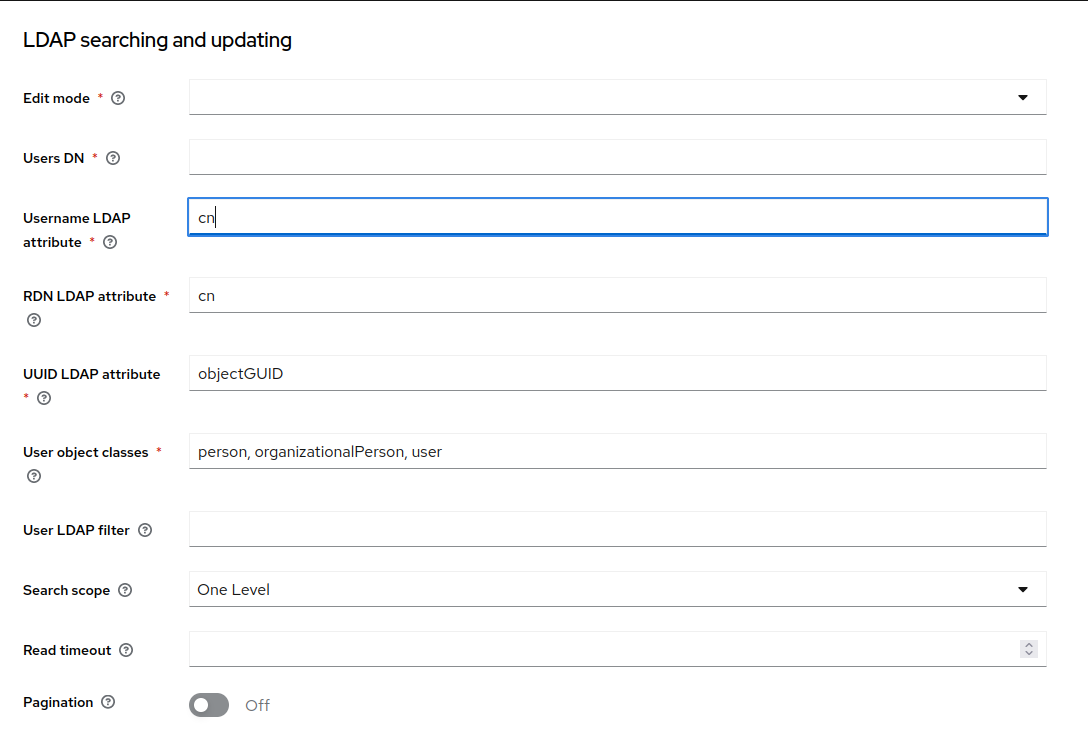
LDAP searching and updating
| Keycloak field | Value |
|---|---|
| Edit mode | READ_ONLY |
| Users DN | ou=people,dc=example,dc=org |
| Username LDAP attribute | uid (cn for AD) |
| RDN LDAP attribute | uid (cn for AD) |
| UUID LDAP attribute | entryUUID (objectGUID for AD) |
| User object classes | inetOrgPerson, organizationalPerson, person |
| User LDAP filter | see Restrict groups authorized to connect |
| Search scope | One Level |
| Pagination | Off |
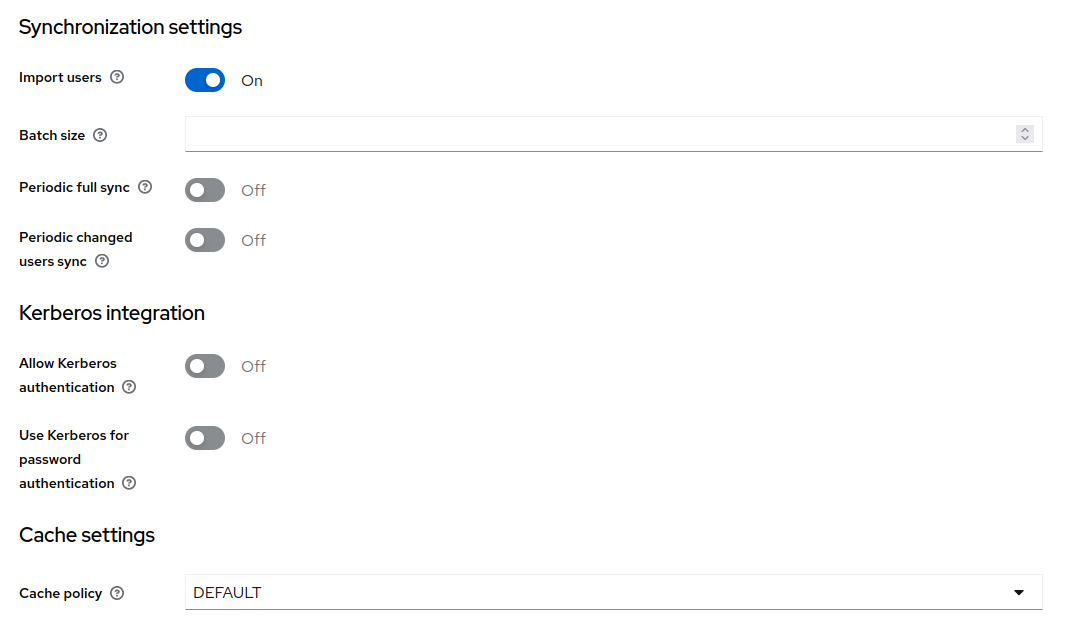
Synchronization, Kerberos and cache
| Keycloak field | Value |
|---|---|
| Import users | Off |
| Periodic full sync | Off |
| Periodic changed users sync | Off |
| Kerberos (all) | Off |
| Cache policy | DEFAULT |
Edit mode =
READ_ONLYwith Import users = Off: Keycloak authenticates against LDAP live and does not copy users into its own database.
Screenshot to update —
../../img/ldap_cache.pngbelow shows Import users = On; it must be Off.
Attribute mappers - Created automatically, nothing to do.
For information only.
Keycloak adds these six when the provider is saved (User federation → ldap → Mappers). Reference only:
| Mapper name | User model attribute | LDAP attribute | Read only |
|---|---|---|---|
| username | username |
uid |
On |
| first name | firstName |
cn |
On |
| last name | lastName |
sn |
On |
email |
mail |
On | |
| creation date | createTimestamp |
createTimestamp |
On |
| modify date | modifyTimestamp |
modifyTimestamp |
On |
Groups are not covered by these — see Map LDAP groups to HPA roles.
Restrict groups authorized to connect
Only the members of the HPA groups may log in. Set User federation → ldap → User LDAP filter with the list of authorized groups:
(|(memberOf=cn=hpa_user,ou=groups,dc=example,dc=org)(memberOf=cn=hpa_admin,ou=groups,dc=example,dc=org))
Active Directory example:
(&(objectCategory=Person)(|(memberOf=CN=xxxx,OU=TRANSVERSAL,OU=Applications,OU=Groups,DC=emea,DC=cib)(memberOf=CN=yyyy,OU=TRANSVERSAL,OU=Applications,OU=Groups,DC=emea,DC=cib)(memberOf=CN=zzzz,OU=TRANSVERSAL,OU=Applications,OU=Groups,DC=emea,DC=cib)))
The filter must begin with ( and end with ), with no backslash before the
|. The directory must populate memberOf on the user entries.
Save.
Screenshot missing —
../../img/ldap_user_filter.png: the User LDAP filter field filled in.
Map LDAP groups to HPA roles
HPA reads the roles claim.
The LDAP groups are turned into Keycloak realm roles, which hpa-client already publishes into that claim.
LDAP group  ──role-ldap-mapper──▶  realm role  ──existing "roles" mapper──▶  "roles" claim
 cn=hpa_admin                       hpa_admin                                 ["hpa_admin", …]
Expected group structure
The mapper reads the membership from the group entries, not from the user
entries. Example with groupOfNames:
dn: cn=hpa_admin,ou=groups,dc=example,dc=org
objectClass: groupOfNames
cn: hpa_admin
member: uid=alice,ou=people,dc=example,dc=org
member: uid=bob,ou=people,dc=example,dc=org
Equivalent in Active Directory:
dn: CN=hpa_admin,OU=Groups,DC=emea,DC=cib
objectClass: group
cn: hpa_admin
member: CN=Alice Anderson,OU=Users,DC=emea,DC=cib
member: CN=Bob Baker,OU=Users,DC=emea,DC=cib
Which attribute each mapper field must point at:
| Mapper field | What it designates | groupOfNames | Active Directory |
|---|---|---|---|
| LDAP Roles DN | branch holding the groups | ou=groups,dc=example,dc=org |
OU=Groups,DC=emea,DC=cib |
| Role Name LDAP Attribute | attribute giving the role name | cn |
cn |
| Role Object Classes | object class of the group entries | groupOfNames |
group |
| Membership LDAP Attribute | attribute listing the members | member |
member |
| Membership Attribute Type | form of the member values | DN |
DN |
| Membership User LDAP Attribute | attribute identifying the user in that DN | uid |
cn |
Membership User LDAP Attribute must be the attribute used as RDN in the
member DNs, and match Username LDAP attribute in
LDAP searching and updating — uid=alice,…
gives uid, CN=Alice Anderson,… gives cn.
The role name reaching the token is the value of Role Name LDAP Attribute
(hpa_admin above). It must match the administrator role declared in
security.config.
If your groups use memberUid with bare user names instead of full DNs, set
Membership Attribute Type to UID and Membership LDAP Attribute to
memberUid.
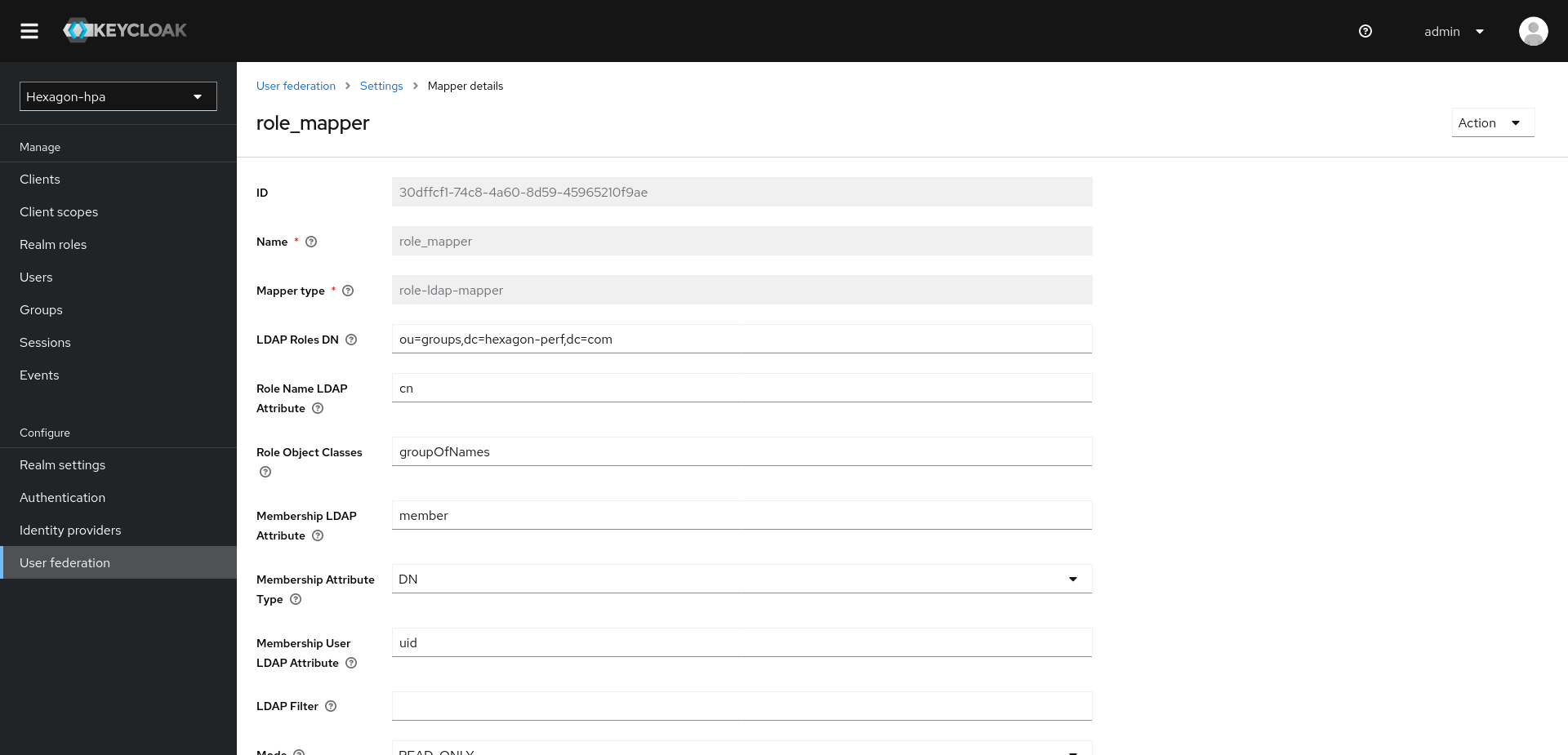
Step 1 - add the role mapper
User federation → ldap → Mappers → Add mapper, type role-ldap-mapper,
name role_mapper:
| Field | Value |
|---|---|
| LDAP Roles DN | ou=groups,dc=example,dc=org |
| Role Name LDAP Attribute | cn |
| Role Object Classes | groupOfNames |
| Membership LDAP Attribute | member |
| Membership Attribute Type | DN |
| Membership User LDAP Attribute | uid |
| LDAP Filter | (empty) |
| Mode | READ_ONLY |
| User Roles Retrieve Strategy | LOAD_ROLES_BY_MEMBER_ATTRIBUTE |
| Use Realm Roles Mapping | On |
Save.
Use Realm Roles Mapping = On makes the LDAP groups realm roles. Off would make them client roles and require a Client ID, which HPA does not use.
Step 2 - verify
Clients → hpa-client → Client scopes → Evaluate → select a user → Generated access token. Expected:
"realm_access": { "roles": ["hpa_user", "hpa_admin", "..."] },
"roles": ["hpa_user", "hpa_admin", "..."]
Then log out and log in again — an existing session keeps its old token. Realm roles (left menu) lists the LDAP groups once they have been resolved for a first user.
The administrator role is the one declared in security.config.
Screenshot missing —
../img/keycloak_client_evaluate.png: the Evaluate tab showing the generated access token.
FAQ : Logout from webview leads to Exception
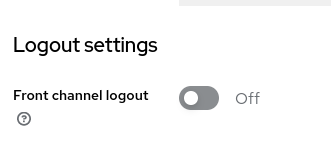
When loging out from webview, if an exception is displayed on the screen, then the following parameter must be checked:
Hpa Realm > Clients > com.ca.apm.webview.serviceprovider > Logout settings
Set Front channel logout to “Off”