A data collection session is a period of time when HPA will collect and package useful data about Calypso behavior. This aims first to be shared to Nasdaq Calypso support or customer delivery teams.
4 tabs available in the Data Collection screen:

- Start Data collection sessions: configure and launch a data collection session
- In progress: status about current data collection session
- Explore archived sessions: access to data collection sessions archive (zip files)
- Disk usage
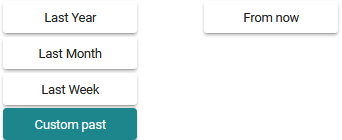
2 different modes of data exports are available, past data or live data
Available data, depending on mode of data exports, are present on left:
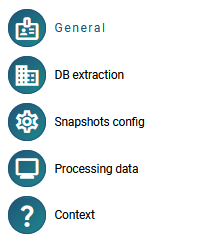
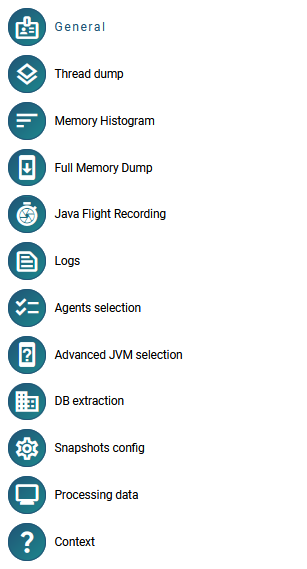
The  section summarizes the data collection session options and allows to launch it.
 During a live data collection session you can modify the log level, the log categories and generate multiple objects dumps.
So the Calypso performance can be impacted.
Data collection session will be applied to the agents selected in 
Auto-attachment of newly connected agents: if an agent connects (or reconnects) while a live data collection session is already running on its environment, it is automatically added to that session.
Starting before the JVM
A live data collection session can be started while no connected agent matches the selected patterns, for example to capture a Scheduled Task launched a few seconds later. In that case, the General section and the agents list state that the session will wait for matching agents until its end.
The session lives from its start until its end date or an explicit stop, whether agents are connected or not:
- status WAITING FOR AGENTS: no agent is currently attached; agents matching the selection join automatically when they connect
- status RUNNING: at least one agent is attached
- when all agents leave (JVM stopped) before the end date, the session goes back to WAITING FOR AGENTS, so a later run in the same period is still captured
A session that no agent ever joined is still archived, with the HPA data (processing data, database extractions, user context). The Explore archived sessions tab shows “No agent joined” for it.
Stopping
In the In progress tab, STOP ends the whole session: every attached agent is stopped and the session is archived, including when no agent is attached. The button is disabled once a stop has been requested.
Memory Histogram includes Java native memory information.
As memory dumps can be big - please check the available disk space before starting your data collection session !
Past periods In that case, data are shared by days, from the first date selected 00 am to the last date selected 00 am.
If we are on the 19th of May 2025, and Last Week is selected
- From will be the 12th of May
- To will be the 19th of May
Data will be exported until the 18th of May - end of day.
Additional data On top of data captured by the monitoring script, logs and customer specific information, data collection session archives can include:
- one (live) or many DB extraction results
- one (live) or many snapshots of Calypso configuration files
- HPA specific metrics aka Processing data covering the data collection session period
Data collection session for Navigators
To make it work, by default please select the navigator name ending by “%1”