DPS overview
A Data Point Selector (DPS) is a saved, reusable definition of “which metric values to look at, and how to summarize them” — a metric selector (agents + metric name), an optional time period, an optional environment override, and an evaluation pipeline (metric type, value filtering, reduction, resampling) that turns raw metric points into a single value, one value per series, or a merged series.
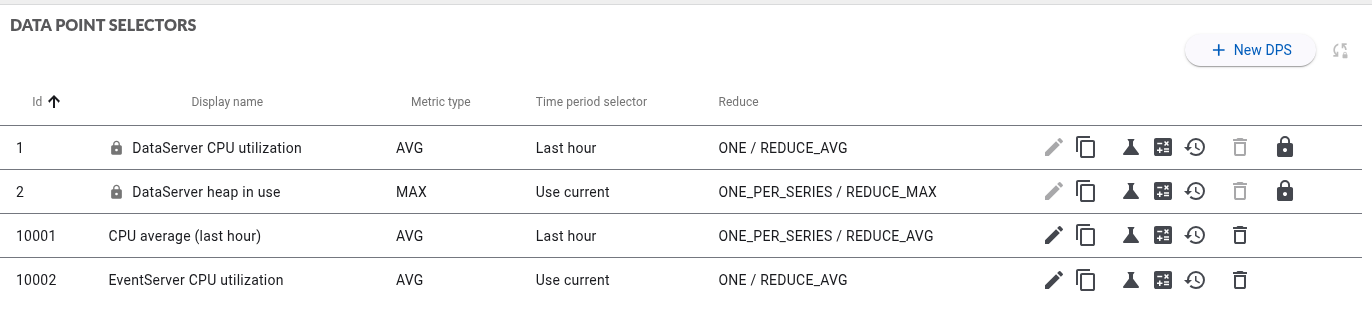
DPS are managed from Data Point Selectors in the left menu. Each row can be edited, copied, tested (list the metrics it currently matches), evaluated (run the full pipeline and see the result), deleted, and its audit history reviewed.
Standard DPS
Rows marked with a padlock are standard DPS provided by Hexagon. They cover common components and are re-applied on every update, so they cannot be edited or deleted — the Edit and Delete actions are greyed out on those rows.
To build your own version of a standard DPS, use Copy: the copy belongs to you and is fully editable.
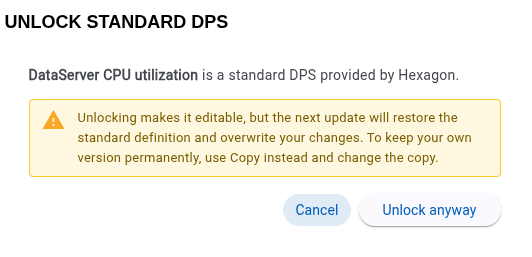
Unlocking a standard DPS is possible, but the next update restores the shipped definition and overwrites the change, so Copy is the durable option.
The evaluation pipeline always runs in this order:
- Metric type selector — which raw field (average / max / min / count) becomes each point’s value.
- Values filtering — keep only the raw points matching a condition.
- Reduce — combine the filtered points into the final result, across one, many, or all series.
- Resample — bucket down to a target number of points whatever time series Reduce left behind (only relevant when no reduce is configured, or scope Merged series is used — see Resample).
Pages in this section: