A time period selector pins the period a DPS is evaluated over. A DPS without one uses the period currently selected in the dashboard. One time period selector can be shared by several DPS.
Time period selectors are managed from the Time Period Selectors tab of Data Point Selectors, and picked in the Metric type selector section of the DPS edit form.
Bounds
A time period selector has a display name and two bounds, From and To. Each bound has a type:
| Type | Bound |
|---|---|
| NOW | the time of the evaluation |
| ABSOLUTE | a fixed date and time |
| DURATION | an offset from the other bound, in seconds, minutes or hours |
From and To cannot both be a duration: a duration needs a fixed bound to start from.
| From | To | Evaluated period |
|---|---|---|
| DURATION -1 HOURS | NOW | the last hour |
| ABSOLUTE 2025-11-19 00:00 | ABSOLUTE 2025-11-26 00:00 | that week, whatever the evaluation date |
| ABSOLUTE 2025-11-19 08:00 | DURATION 2 HOURS | 08:00 → 10:00 on that day |
Save the current period fills From and To with the period selected in the dashboard.
The Time Period Selectors tab
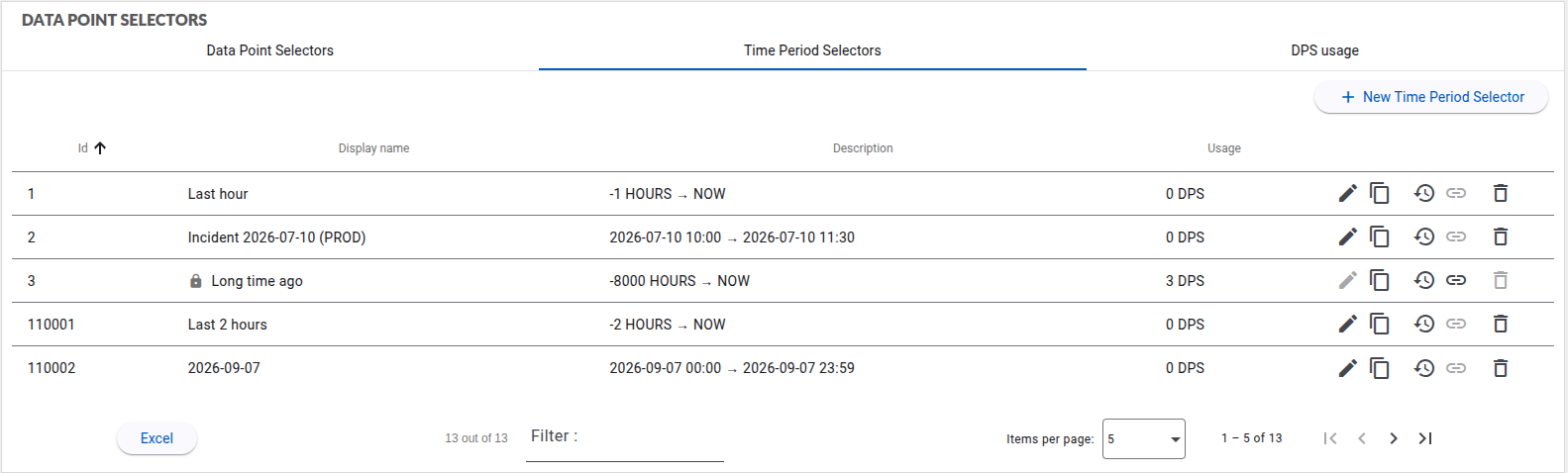
Each row shows:
| Column | Content |
|---|---|
| Id | identifier of the time period selector |
| Display name | name shown in the DPS edit form |
| Description | the bounds as read, e.g. -1 HOURS → NOW. ABSOLUTE bounds are shown in the local time zone |
| Usage | number of DPS pinned to the time period selector, including the inline DPS of custom graphs (not listed in the DPS tab), e.g. 3 DPS (1 inline) |
Every column can be sorted, and the filter box also searches the description.
Each row can be edited, copied, deleted, and its audit history reviewed. The link action of a row opens the Data Point Selectors tab, filtered on the DPS pinned to the time period selector; the close button of the filter banner shows every DPS again. The inline DPS of custom graphs are not part of that list: the link tooltip gives their number, and the link is greyed out when only inline DPS of custom graphs use the time period selector.
A time period selector still used by a DPS cannot be deleted: the Delete action is greyed out until no DPS uses it.
Shared time period selectors
A change to a time period selector applies to every DPS pinned to it. When it is used by other DPS, the edit dialog shows a warning with the number of DPS concerned. To change the period of one DPS only, Copy the time period selector and pin the copy to that DPS.
Standard time period selectors
Rows marked with a padlock are standard time period selectors provided by Hexagon, shipped with the standard DPS that use them. As for standard DPS, they cannot be edited or deleted, and Copy gives an editable version.